
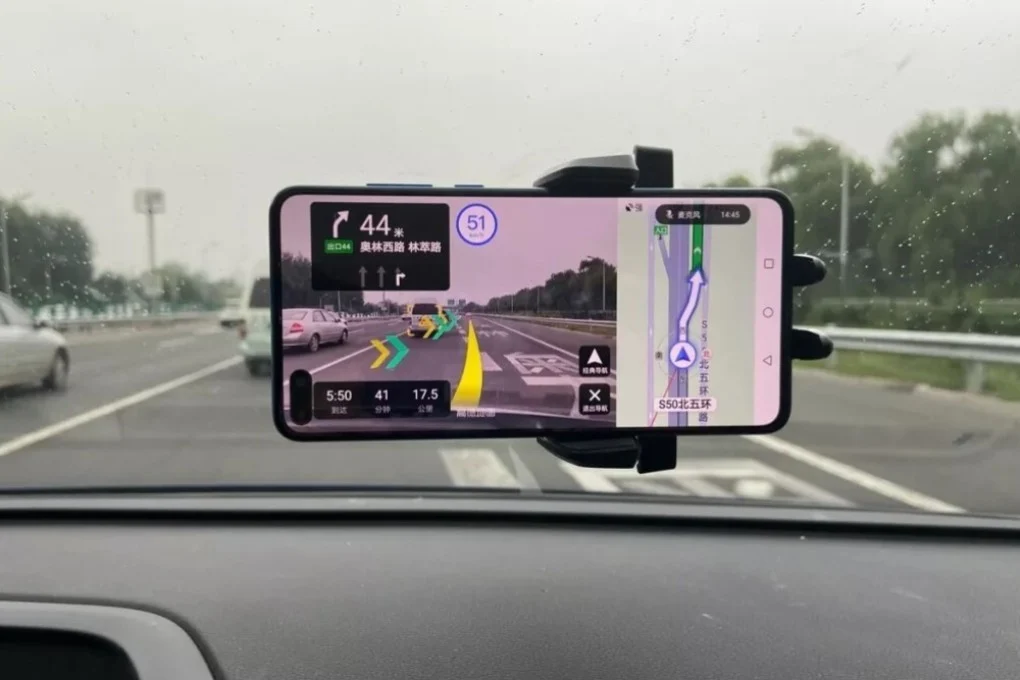
Google Maps is blocked in China — and even with a VPN running, it’s unreliable for actual navigation.
Routes don’t load. Nearby places are missing. And when directions do appear, you follow them and end up half a block from where you meant to be — sometimes more. You walk around confused for a few minutes before realising the map is just… wrong.
This isn’t a connectivity issue you can fix with a better VPN. It’s a coordinate problem baked into how China’s mapping system works, and it affects every foreign map app that hasn’t been built specifically for the Chinese market. This guide explains what’s actually happening and walks you through setting up Amap — the app locals actually use — from scratch.
Trying to sort out navigation before your China trip? This guide is part of our Maps and Navigation in China hub, where we cover map apps, offline navigation, translation tools, and common problems foreign travelers run into on the ground.
Why Google Maps Doesn’t Work in China
There are two problems, and they’re different enough to be worth separating.
The data problem. Google doesn’t operate in China, which means its map data for the mainland is maintained remotely and updated inconsistently. Real-time traffic doesn’t work. Business listings go stale. Transit routes lag behind actual schedules. In a country where a new metro line can open with three months’ notice, that matters.
The coordinate problem. China uses a coordinate system called GCJ-02, which is mandated by law for all mapping services operating on the mainland. Google Maps uses the global standard (WGS-84). The two don’t match — and the offset is typically 100 to 500 meters, depending on where you are.
In practice, this means your blue dot shows you standing in a river when you’re on the bridge next to it. Turn-by-turn walking directions drift away from the actual street. You follow the route and end up at the wrong building entrance.
Even if you get Google Maps working through a VPN, the coordinate offset is still in the data itself. Your blue dot will be wrong regardless of your connection quality. For navigation, it’s not worth the effort.
What to Use Instead
Three apps are worth knowing. One of them covers most situations.
Amap (高德地图) is what locals actually use for day-to-day navigation. It’s built on Chinese coordinate data, handles walking, driving, transit, and ride-hailing, and has an English interface option. If you only install one map app before your trip, make it this one.
Apple Maps is the easiest option if you’re on iPhone. It pulls from local Chinese data providers (Amap-based), which means the location accuracy is solid. No setup required — it works out of the box in major cities. Gets less reliable in rural areas, but for Beijing, Shanghai, Chengdu, and similarly sized cities, it’s genuinely good.
Baidu Maps is the other major Chinese app. Very accurate, and the locals who don’t use Amap use this. The interface is cluttered and mostly in Chinese, and installing it on Android can interfere with GPS for other apps. Worth having as a backup if you need it, but not the one to start with.
| App | Accuracy | English Support | Best For |
|---|---|---|---|
| Amap (Gaode) | Excellent | Partial (switchable) | Everything — main app |
| Apple Maps | Very good | Full | iPhone users |
| Baidu Maps | Excellent | Minimal | Backup / driving |
| Google Maps | Poor in China | Full | Reference only |
Setting Up Amap: Step by Step
Download
Search “Amap” or “高德地图” in the App Store or Google Play. The icon is a red teardrop on white. Do this before you arrive in China — not because it’s unavailable inside the country, but because it’s one less thing to sort out when you land.
The Amap home screen after download.
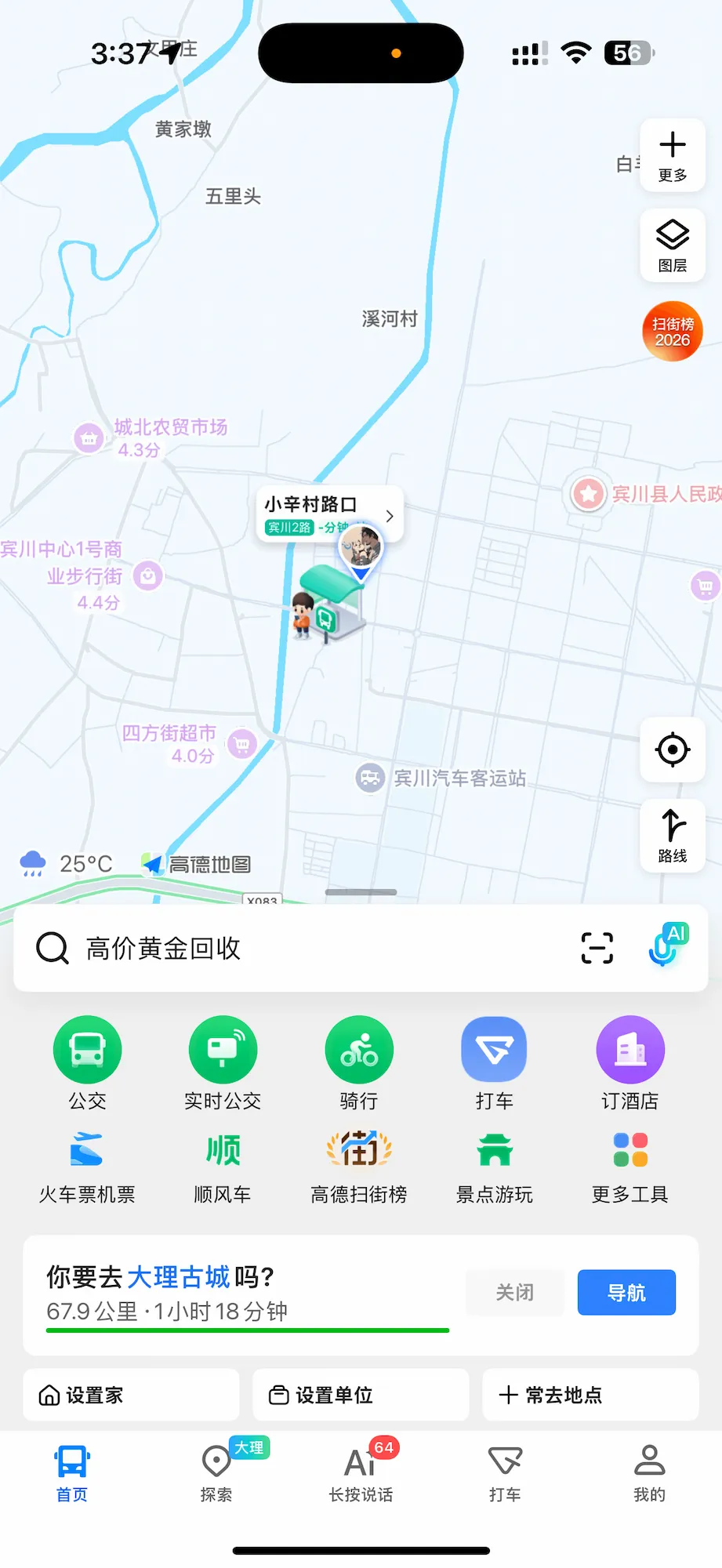
Everything is in Chinese by default — the search bar is at the bottom, with shortcuts for transit, ride-hailing, train tickets, and nearby attractions. The bottom nav tabs from left to right are: Home, Explore, Voice search, Taxi, and Me (我的).
Switch to English
The default language is Chinese. Here’s how to change it:
Go to 我的 (Me) → 设置 (Settings) → 通用 (General) → 语言 (Language)
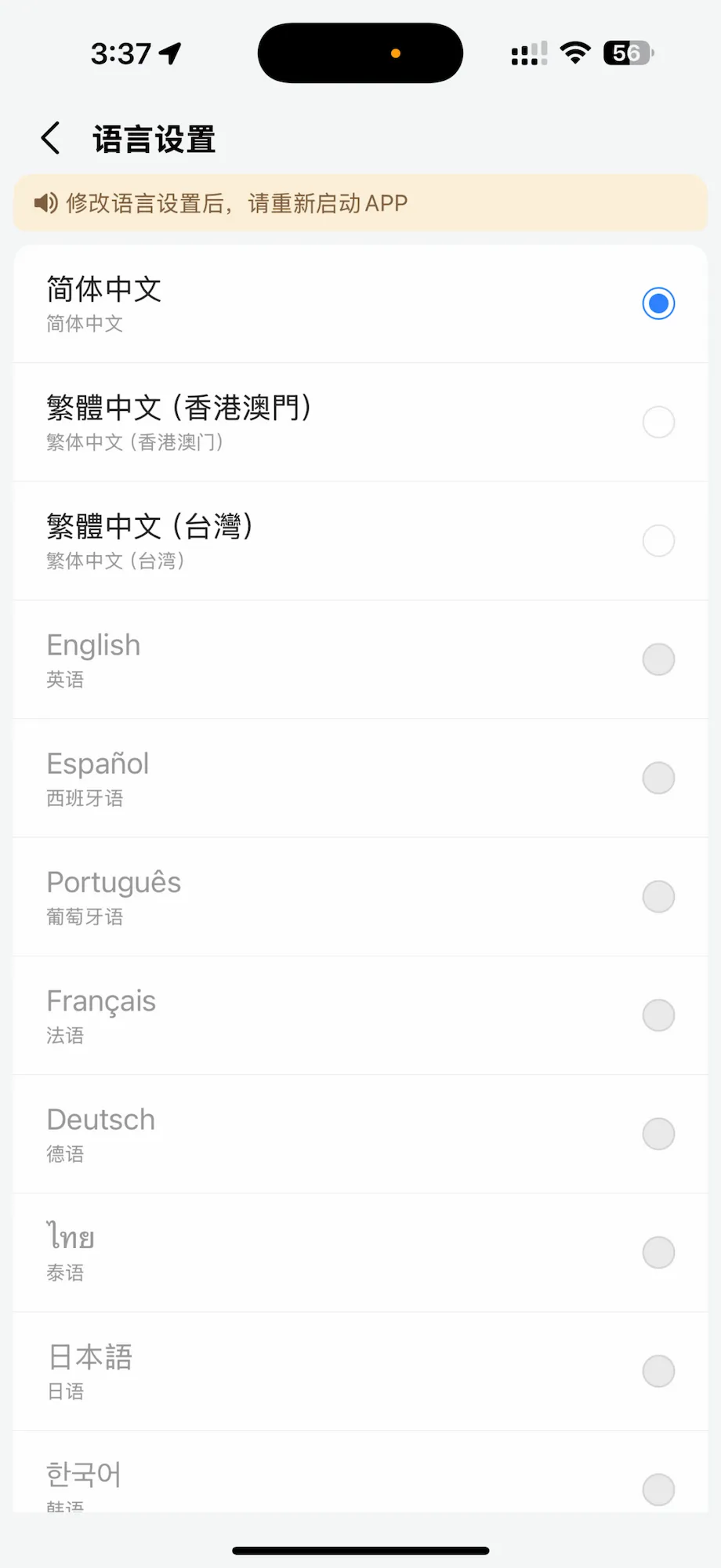
The language settings screen. Simplified Chinese is selected by default (blue dot). English is the fourth option down. Tap it, then close and restart the app — there’s a note at the top of this screen reminding you to do this.
Select English, then fully close and reopen the app. The main interface switches to English after restart. A few deeper menus stay in Chinese, but search, directions, and transit all work in English once this is set.
Searching for Places
Once you’re in the app, tap the search bar and type your destination. For well-known places — hotels, landmarks, train stations — English search works fine. For smaller spots or street addresses, use the Chinese name if you have it. Copy-pasting a Chinese address from a booking confirmation directly into the search bar is the most reliable method.
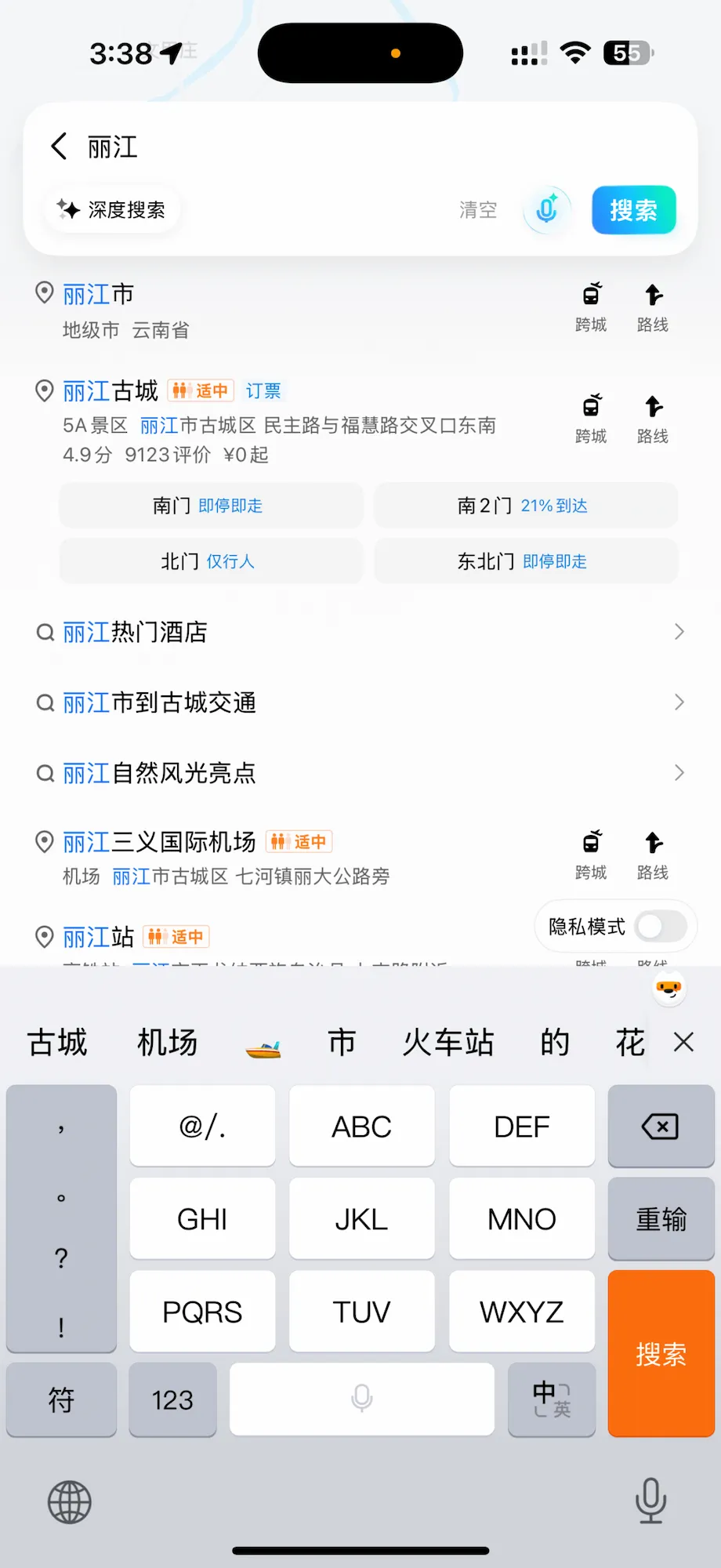
Searching for Lijiang (丽江). The results show the city, Lijiang Ancient Town (丽江古城) with its multiple entrances — South Gate, South Gate 2, North Gate, East Gate — along with real-time status for each. This level of entrance-specific detail is something Google Maps simply doesn’t have for Chinese attractions.
That breakdown of multiple entrances is worth noting. For major sites like Lijiang Ancient Town, the Forbidden City, or West Lake, knowing which entrance to head for makes a real difference — especially if you’ve pre-booked a timed entry ticket for a specific gate.
Getting Around: Transit Directions
Tap the route icon (路线) and enter your start and destination. Amap gives you options for transit, walking, driving, and cycling. The transit directions are detailed enough to be genuinely useful underground.
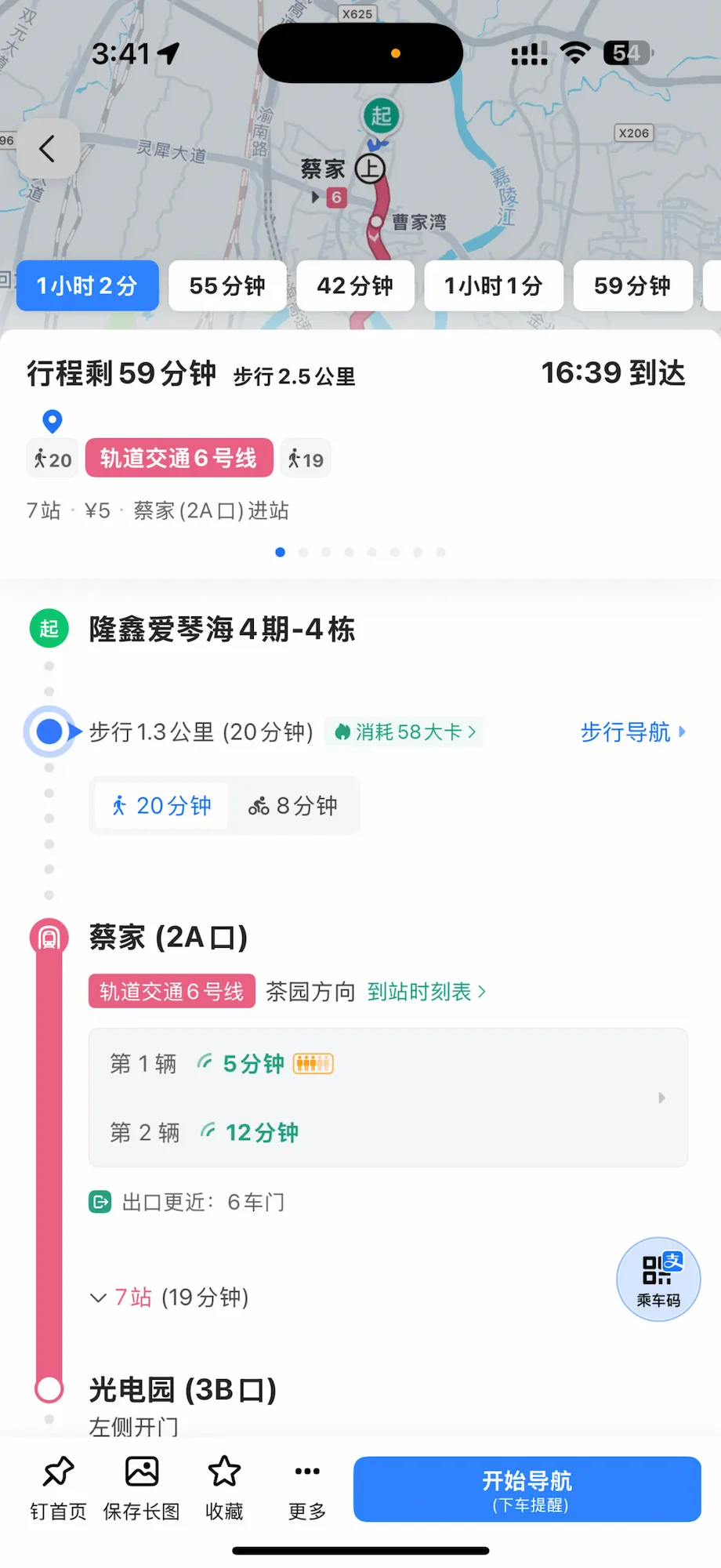
A transit route breakdown. The route shows: walk 1.3km (20 min) to Caijia station, board Line 6 at Exit 2A, ride 7 stops (19 min) to Guangdianyuan, exit at Exit 3B. There’s also a note that the left-side door opens at the destination — so you know which side of the carriage to stand near. The next train is in 5 minutes.
Two details in that screenshot are worth paying attention to. First, Amap tells you which exit to use at both your boarding and alighting station — not just the station name. At large Chinese metro stations with 10+ exits spread across different streets, this saves real time. Second, the carriage door direction tip (左侧开门, left-side door) means you can position yourself near the exit before the train stops, which matters when you’re carrying luggage or in a hurry.
Driving Navigation
If you’re in a hired car, taxi, or self-driving, Amap’s turn-by-turn navigation is what the driver will likely use anyway.
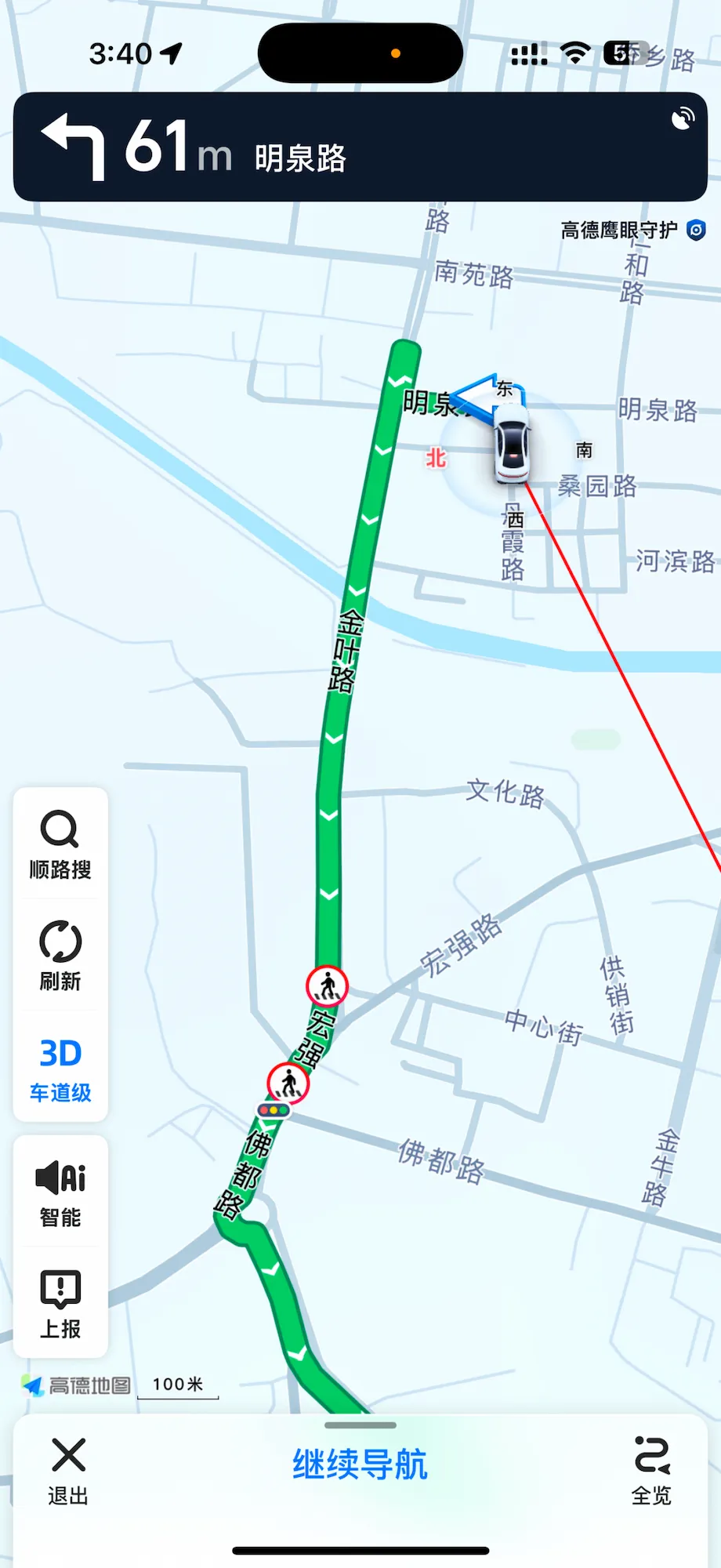
Active driving navigation. The green route is clear, the next instruction (turn left in 61m onto Mingquan Road) is shown at the top. Real-time traffic is overlaid on the route.
The interface stays in Chinese during navigation even with English set as the app language — the turn instructions are read aloud in Chinese. This doesn’t matter much if someone else is driving, but worth knowing if you’re navigating for a driver.
Download Offline Maps
This step gets skipped a lot and then regretted inside a subway tunnel.
Go to 我的 (Me) → 工具箱 (Toolbox) → 离线地图 (Offline Maps)

The offline map download screen. The app recommends a Base Package (基础功能包, 43.9MB map + 12.2MB navigation data) described as essential for cross-city navigation. Below it is the current city — Dali Prefecture (大理白族自治州) at 14.2MB map + 21.2MB navigation. Tap the download arrow on the right for either.
Download the Base Package first — it’s labeled 跨城导航必备 (essential for cross-city navigation) and is under 60MB total. Then download each city you’re visiting. City maps are typically 15–35MB each, so downloading three or four cities before you fly costs you almost nothing in storage.
Once downloaded: works in subway tunnels, saves mobile data, loads faster, and doesn’t stop functioning when your signal drops in a basement restaurant.
The One Thing Most People Get Wrong
Searching in English works for major landmarks, but for anything smaller — a specific street, a local restaurant, a lesser-known temple — English search often returns no results or the wrong place.
The fix: when you book a hotel or restaurant, copy the Chinese address from the confirmation email and paste it directly into Amap’s search bar. Don’t try to translate it yourself. The Chinese characters map exactly to what’s in the database; a transliteration often doesn’t.
If you’re using Didi and need to set a pickup or drop-off point, the same principle applies — paste the Chinese address from wherever you found the location rather than typing the English name. The DiDi guide covers this workflow in more detail.
Apple Maps: If You’re on iPhone
Worth mentioning separately because the setup is zero. Apple Maps on iPhone in China pulls from local Chinese data, which means the coordinate accuracy is correct — unlike Google Maps. In Beijing, Shanghai, Chengdu, Hangzhou, and most other major cities, it navigates reliably for walking and transit.
The honest limitation: it gets thinner outside urban areas. For rural Yunnan, remote Xinjiang, or anything off the main tourist trail, Amap’s data depth is noticeably better. But for a city-focused trip, Apple Maps as your primary and Amap as your backup is a completely reasonable setup.
Offline Backup: Organic Maps
One app worth knowing about if you’re heading anywhere remote: Organic Maps. It’s free, open-source, works entirely offline, and the China data (from OpenStreetMap contributors) is surprisingly good for metro stations, temples, and hiking trails.
It won’t replace Amap for transit routing or real-time navigation, but as a pure offline map when you have no signal at all, it’s the most reliable option. Download the region data before you leave WiFi.
A Note on Internet Access
Even with the right app installed, you need a stable data connection for real-time routing, live transit times, and Didi integration. Amap’s offline maps cover the basics without signal, but anything that updates — traffic, transit schedules, the Didi hailing — needs data.
If you haven’t sorted your internet setup yet, the China SIM card and eSIM guide covers your options. Most travelers sort this with an eSIM before landing or pick up a local SIM at the airport on arrival. Either way, handle it before you need to navigate somewhere on your first day.
FAQ
Can I use Google Maps in China with a VPN? You can open it, and it’ll look normal. But the location data is still offset by up to 500 meters because of China’s coordinate system — the VPN doesn’t fix that. For any actual navigation, use Amap or Apple Maps.
Does Amap work in English? Partially. After switching the language in settings (Me → Settings → General → Language → English, then restart), the main interface, search, and directions work in English. Some settings menus and turn-by-turn voice navigation stay in Chinese. It’s usable — just not perfectly bilingual.
Do I need a Chinese phone number to use Amap? No. You can use Amap without registering at all — just download and open it. Registration unlocks some features like saving favorites across devices, but for basic navigation it’s not required.
Does Apple Maps work in China? Yes, and better than most people expect. It uses local Chinese data so the coordinates are accurate. Works well in major cities; less reliable in rural areas.
Will Amap work without internet? For basic map display and simple routing, yes — if you’ve downloaded offline maps for that city. Real-time features (traffic, live transit times, Didi) need a connection.
What about Baidu Maps? Accurate, locally built, used by millions. The interface is mostly in Chinese and the app can interfere with GPS for other apps on Android. Worth knowing about, but Amap covers the same ground with a more foreigner-friendly setup.
What’s the best map app for driving in China? Amap. It’s what most Chinese drivers use and what most navigation systems in rental cars default to. Turn-by-turn voice is in Chinese regardless of your language setting, but the route display is clear.
Related Guides
Sorting out navigation is one piece of the puzzle. These cover the rest:
- China Transport Guide for Foreigners — High-speed rail, Didi, metro, and how to pay for all of it
- How to Use DiDi in China — The full workflow for getting a ride without speaking Mandarin
- China SIM Card & eSIM Guide — Getting data on your phone before and after you land
- Internet & VPN Guide for China — What’s blocked, what isn’t, and which VPNs actually work
- China Payment Guide for Foreigners — Alipay, WeChat Pay, and how to link your foreign card
Last updated: June 2026. App interfaces and features change with updates — screenshots reflect Amap as of mid-2026.